


.jpg)
Deirdre Hennigar
Subject matter expert
Overview
Microsoft Entra ID makes third-party collaboration easy. Vendors, contractors, partners, auditors, and customers can be invited into a tenant as guest users without needing full internal accounts.
During testing, we found an attack path where a Guest account user could view a tenant's legacy All Users group and enumerate other users, including both Guests and Members, in that tenant.
Current CIS Microsoft 365 Foundations benchmarks include control 5.1.6.2, “Ensure that guest user access is restricted,” but the compound scenarios described in this article still deserve explicit review and remediation, especially for businesses with older tenants that may have been created during the lifetime of the All Users group setting toggle.
TLDR Tips
Tenant recommendations:
Cleanup
- Delete the All Users group.
- Review guest self-service sign-up.
Guest visibility controls
- Hide group visibility wherever possible.
- Restrict guest access to the most restrictive option.
Use the visibility controls together where possible.
- Hidden groups plus restricted guest access is the strongest posture.
- If group visibility cannot be hidden for a business reason, restricted guest access becomes mandatory.
CIS recommendations:
- Enable sub-control 5.1.3.1, “Ensure a dynamic group for guest users is created.”
- Enable sub-control 5.1.6.2, “Ensure that guest user access is restricted.”
What are Guest accounts?
An external guest account is an identity from outside an organization that is invited into a Microsoft Entra tenant for collaboration.

For example, a contractor using name@vendor.com can be added to a
customer's tenant as a guest user. They keep their original identity, but
receive limited access to specific resources like Teams, SharePoint, apps,
or groups.
In Entra ID, these accounts often appear with #EXT# in the username
and userType = Guest.
Guest accounts, depending on tenant configuration, may be able to view groups including:
- contractors
- vendor accounts
- partner identities
- customer-facing users
- privileged-looking accounts
- service or shared accounts
- email addresses and user principal names
- sometimes titles, departments, or company names
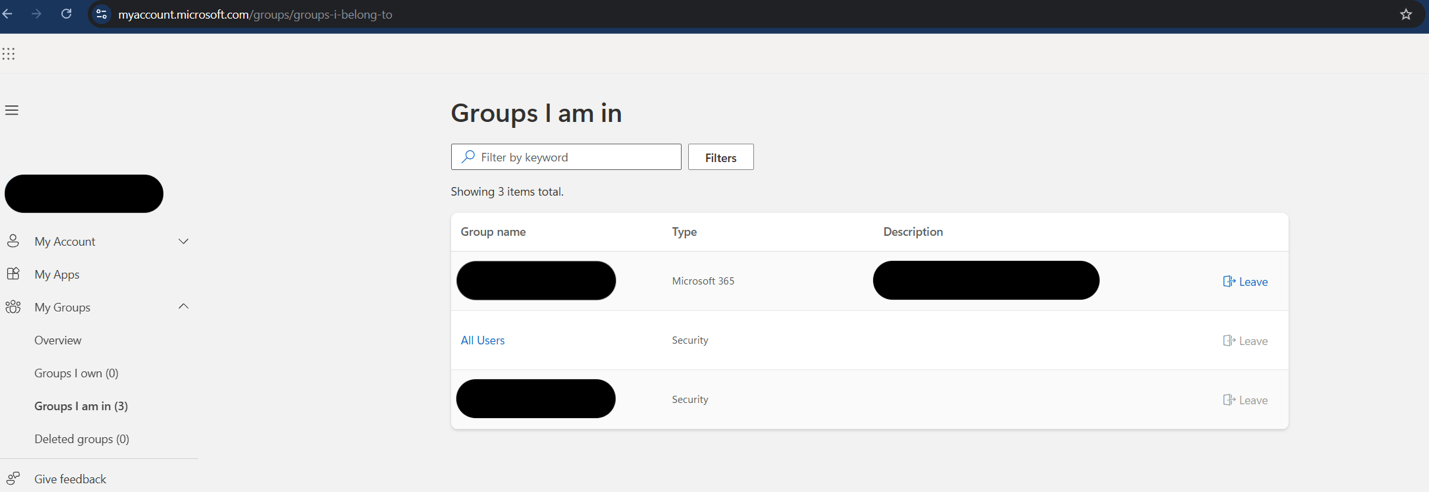
What is the All Users group?
The All Users group appears to be a legacy Microsoft-created catch-all group intended to simplify early tenant onboarding. It functioned as a broad directory group for everyone in the tenant, making it easy to attach default resources, collaboration spaces, or access assignments during initial Microsoft 365 setup.
In older tenants, this kind of group may remain long after the original setup workflow or product behavior changed.
In a modern tenant, broad group usage should be explicit. Groups should exist because they serve a current purpose, not because they were inherited from an older default setup. The historical All Users model is especially risky because broad “all users” targeting now usually belongs inside specific product controls, such as Conditional Access, Intune, or Purview, rather than in one legacy directory group that may include guests.

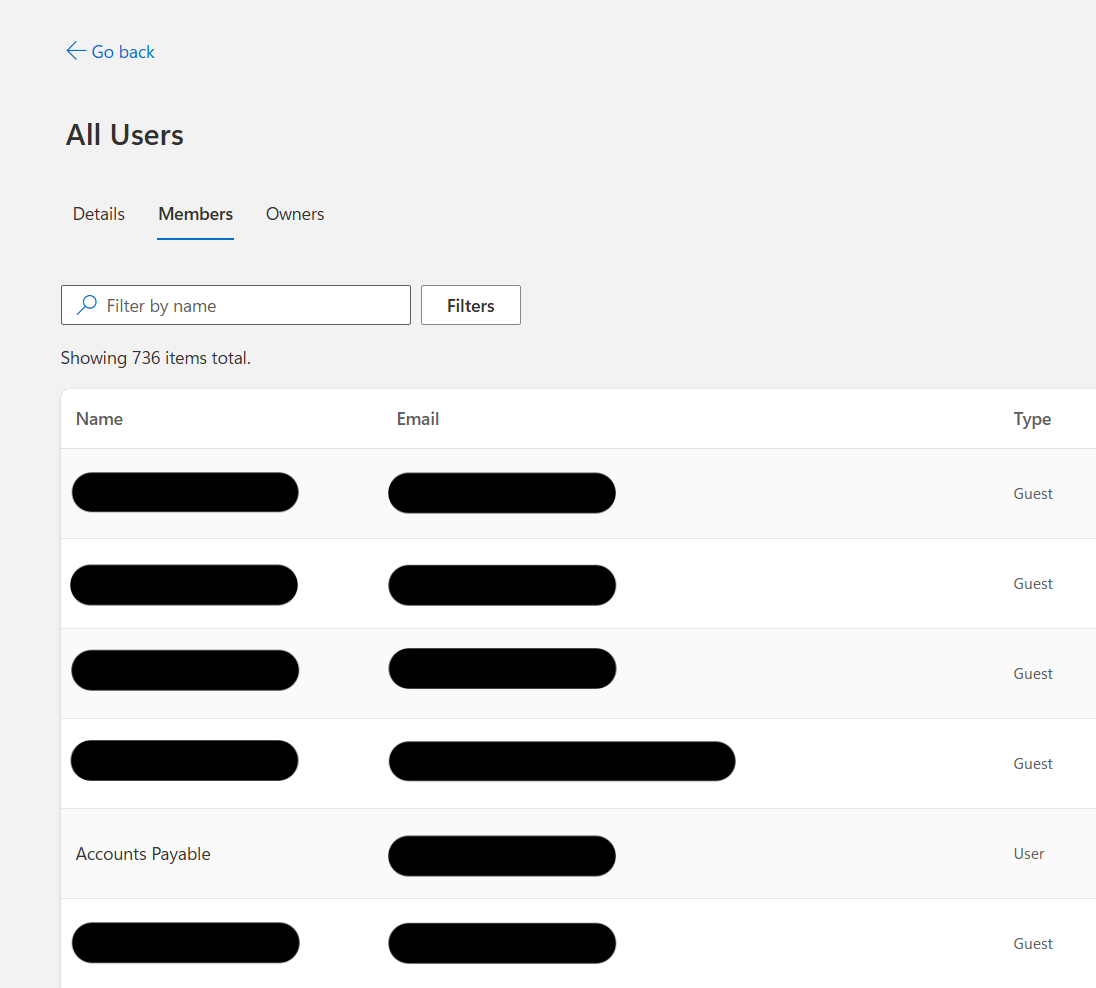
Within the All Users group, the external Guest user can view M365 Member accounts, external Guest accounts, and Group Owners.
What is the impact?
A compromised Guest account, or even a low-trust contractor account, can use this visibility to build a map of the tenant's external collaboration surface. In some environments, the collaboration graph itself becomes sensitive business intelligence.
Business perspective
This visibility creates opportunities for:
- merger or acquisition reconnaissance
- identifying strategic customers or high-value accounts
- competitive intelligence gathering
- discovering outsourced security or IT providers, including Shadow IT
- revealing stealth partnerships before public announcement
Offensive security perspective
It can support:
- password spraying against external identities
- MFA fatigue targeting
- supply-chain mapping
- discovery or impersonation of customer, vendor, and third-party relationships
- finding users likely to have access to shared apps, SharePoint, Teams, or access packages
If All Users is attached to SharePoint, Teams, enterprise apps, licensing, or access packages, then the issue escalates from information leak into unintended access.
A default public SharePoint site assigned broadly can become a collection point for files that every included identity can access. This kind of broad collaboration access surface can also be used maliciously for malware distribution.
How did this happen?
Usually, this is not a single bad setting. It is a collection of settings turned sour.
- The tenant supports guest collaboration.
- Guest users are invited or allowed to self-service sign up through an app or user flow.
- A broad dynamic group exists, named All Users.
- The group rule includes guests, intentionally or accidentally.
- Guest access is not set to the most restrictive level.
- Group membership is not hidden.
- Guests can view the group and enumerate its members and owners.
Microsoft's default guest access level is “limited access.” Despite the name, Microsoft documents that this default still allows guests to see membership of all non-hidden groups. The stricter option blocks guests from seeing other users and group memberships.
The issue often comes down to this: the tenant is configured for collaboration, but the directory model still assumes broad group visibility is acceptable.
What should we do?
Broad dynamic groups that include guests should not exist unless there is a clear business reason and compensating controls. The strongest posture is to hide group visibility wherever possible and restrict guest access to the most restrictive option.
Think of restricted guest access as the second layer of protection. If you cannot hide group visibility because of a business workflow, then restricted guest access becomes mandatory.
First, verify what is possible from a guest account:
- Can a guest view My Groups?
- Can a guest view the All Users group?
- Can a guest list members of that group?
Then answer what should be allowed:
- Should a guest be able to view My Groups?
- Should a guest be able to view the All Users group?
- Should a guest be able to list members of that group?
- Should the group be assigned to SharePoint, Teams, apps, licenses, or access packages?
- Should default or public SharePoint sites be accessible to broad groups?
- Should guest access be set to the most restrictive level?
- Should guest self-service sign-up be enabled?
Hide group visibility wherever possible
Start by reducing group visibility. If guests cannot see broad groups and group membership, the collaboration graph is much harder to enumerate.

Set guest access to the most restrictive option
Guest user access should be restricted to properties and memberships of their own directory objects. This is the second layer of protection, and it becomes mandatory when group visibility cannot be hidden.

Audit your tenant groups
Any dynamic group intended for employees only should exclude guests:
(user.objectId -ne null) -and (user.userType -eq "Member")
Review broad or ambiguous groups such as:
- All Users
- Everyone
- All Employees
- All Staff
- All Contractors
- Guests
- External Users
For each group, check whether users, including guests, can see group assignments. Every broad group should have a clear owner, a documented current purpose, and an explicit reason for each resource assignment.
-
If an All Users group is present and unused, delete it.
Note: This All Users group is not the same concept as “All Users” targeting in Conditional Access, Intune, or Purview. Those products use service-specific scopes for object types; this legacy group is a broad directory object.
- If an All Users group is present and in use, migrate users to alternate groupings and delete the All Users group.
Review guest self-service sign-up
If external users can onboard through an application, make sure the resulting guest accounts are not automatically dropped into broad groups with visibility into the tenant.

Closing thoughts
Guest collaboration is not the problem. Unscoped guest visibility is the problem.
A contractor should be able to access the project, app, or workspace they were invited to use. They should not automatically inherit a tenant directory map of every other contractor and vendor.
The fix is not complicated:
- restrict guest visibility,
- remove guests from broad internal groups,
- and delete old collaboration surfaces that no longer have a purpose.
References
- MicrosoftRestrict guest user access permissions in Microsoft Entra ID
- MicrosoftDefault user permissions in Microsoft Entra ID
- MicrosoftManage rules for dynamic membership groups in Microsoft Entra ID
- MicrosoftAdd B2B guest sign-in with self-service sign-up user flows
- TenableCIS Microsoft 365 Foundations v6.0.1, Ensure that guest user access is restricted
- Trend MicroEnable All Users Group
- MicrosoftCreate a rule for all users
- Merill FernandoAzureAD Restricted Access - Guest Permission Level